Under the hood

None of this is in your way. None of it is hidden either.

Everything on the rest of this site is true without knowing any of what follows. But if you came for the numbers, they are all there — in the bar along the bottom, in the panels you choose to open, and in a formula file you can write yourself.

Your own formulas

Fractint wrote the format. Fractaria reads it.

Fractaria reads Fractint .frm formula files. Import one and its entries become fractals you can explore, with sliders on their numeric parameters, named menus on their function slots, and a Julia dual worked out from the formula itself — the same right-click that opens a Julia on a built-in family works on any of yours that draws a parameter plane. A .frm has no field for the framing, so Fractaria goes and measures one: the conventional rectangle is Mandelbrot's, and on any other library it would leave most of the formulas on a black screen. An entry that does not compile is listed with its line and column, and the rest of the file loads anyway.

It reads the formula, not a description of it

The parameters a formula declares become real controls, in the same panel and with the same behavior as the ones that ship with the application. The two controls a written formula makes meaningless — the bailout shape, which the formula writes for itself, and the triangle average, which needs an additive constant that a .frm may not have — disappear instead of sitting there inert.

Parameters · Julia dual · three of the six texture sources

Nearly every family is a shelf

Degree, exponents, constants, thresholds — the sidebar builds itself around whichever family you are in. A family is a shelf of shapes, not one picture, and an imported formula is one too, for as many parameters as it declares.

Per-family parameters · rebuilt on the fly

And it travels with the preset

Publish a fractal built on a formula of yours and the formula goes with it, so whoever opens it sees the picture you saw rather than an error. The gallery marks those presets, so nobody is surprised.

The recipe carries its formula

The numbers

Underneath, it is still mathematics.

Coordinates you can read

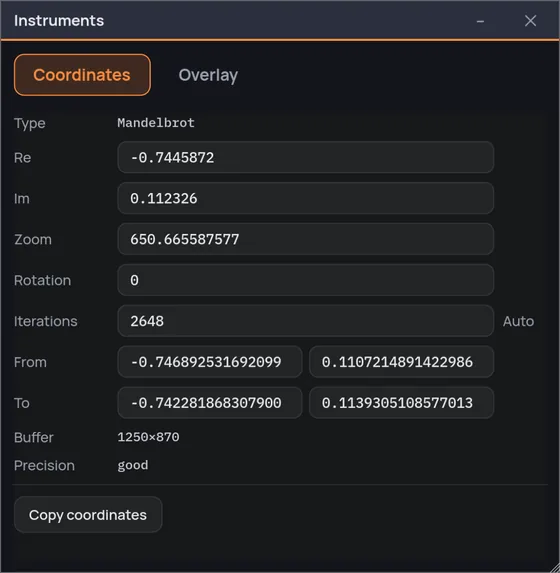
Center, extent, rotation, zoom and a precision margin that tells you how much room is left before double precision starts to show — and past that point sixteen of the twenty-six built-in families keep going on a perturbed path, where the cell stops reporting a margin and reads «δ · 10⁻ⁿ»: not the room left, but how far down the delta it carries reaches. The other ten — Talis, Spider, the four transcendental families, Magnet I and II, Newton and Nova — and every imported .frm have no perturbed step to take: there the margin goes on counting down, and the cell ends at «AT THE LIMIT». Copy the numbers, keep them — or write them back: the Instruments window (Cmd/Ctrl+K) opens nine boxes you can type into — the center's two numbers, zoom, rotation, iterations, and four more for the two corners the view runs between — prints the center in exact fixed point once the view is deep, and takes a pasted «from (a, b) to (c, d)» apart into its four numbers.

How big this actually is

The scale bar answers in meters: how wide the whole fractal would be, drawn at the magnification the view is showing on your screen. Go deep enough and the answer stops being meters, then kilometers, and becomes light years — which is the only honest way to say what a deep zoom is. Where the system cannot say how dense the screen is, that line is left out rather than guessed.

Iterations that measure themselves

Iterations are the compute budget, not a color control: the color scale is a setting of the palette, so raising them adds detail instead of repainting what you had. The full pass runs up to eight times deeper than the number you choose — the coarse passes it draws first stay at the base budget — so most of the pixels that would have been left undecided get their real answer. The ones still undecided when that budget runs out — it is capped at 200,000 iterations — are not painted over: the map of where the count stops calls them «budget ran out — unknown», and Glow lights exactly those. And when a noticeable share of the picture runs past the color scale, the sidebar says which percentage rather than quietly flattening it.

It knows when to stop

Points inside the set are detected by the cycle their orbit falls into, not by exhausting the loop. That is what keeps the true interior — which can be 40% of the image — out of the iteration budget, and what makes the automatic iteration count mean something: what it counts is the pixels that ran out, no longer drowned in a constant.

The escape data is kept

Which is the whole reason recoloring is instant: a new palette is a remap of numbers already computed, not a second render. It is also why four of the six texture sources can be blended live at any zoom depth — the remap reads the results it kept, not the coordinates, so its cost does not grow as you go down. The other two, stripe and triangle average, are accumulated along the orbit: switching one on or off writes a parameter of the fractal, and that recomputes.

The data bar along the bottom of the window: fractal type, center, zoom, rotation, extent, buffer and precision margin.

The bar along the bottom of the window, actual size.

Instruments

The measuring tools live in a drawer, not in your way.

One window, two tabs. The first is the numbers above, made writable. The second is seven overlays that draw on top of the picture: how big what you are looking at actually is, what the orbit under your pointer is doing, why that black patch is black. Each one is a switch, and every one of them is off until you ask.

Orbit under the pointerPlane coordinates Scale bar and view sizePeriod atlas Why it is blackYou are here Cursor cross and tape

Why it is black is the one worth switching on. A flat stretch of image has three possible reasons — the orbit closed into a cycle and is inside for good, the iterations ran out, or the point escaped past the end of the color scale, where the ramp had no steps left — and until something paints them apart they look identical. One of the three no knob will ever change. The other two each name their own remedy, and it is not the same remedy: more iterations for one, a longer color scale for the other. This is how you find out which you are looking at.

The instruments window, coordinates tab: the type at the top, then writable fields for center, zoom, rotation, iterations and the two corners of the view, buffer and precision read-only underneath, and a single Copy coordinates button.

Your machine

Measured, not guessed.

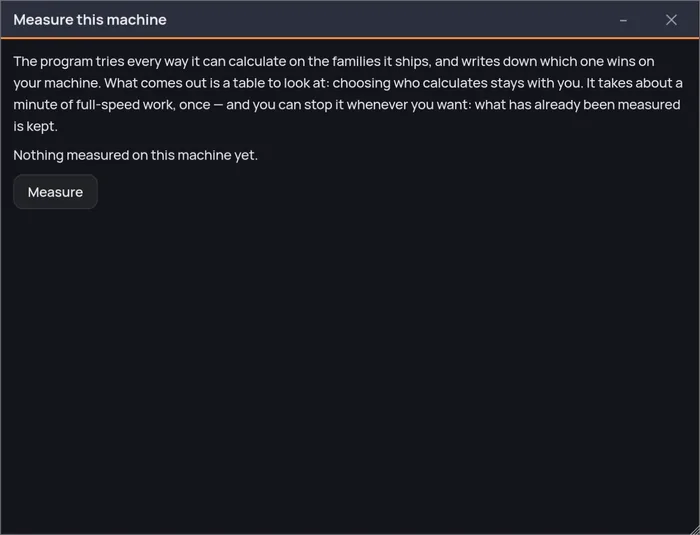
A short bench measures what this computer can actually do — the CPU, the SIMD lanes of your processor and, where there is one, the graphics card, all at once and in slices — and puts the result in a table. It does not choose for you. It used to, and the number did not support it: across fifty views the rule picked the faster engine thirty-four times, and the sixteen it got wrong cost up to four and a half times the render. One in three is too many for a choice made on your behalf.

CPU and graphics card are not expected to produce identical pixels, and Fractaria does not pretend otherwise: the card computes in single precision, and where a view needs more margin than it has the work goes back to the CPU — with the pill at the top of the window saying who is actually working, rather than one quietly corrected to match the other. The pill is also where you choose: it lists the engines with the reason written beside the ones this view cannot use — «zoom too deep», «formula has no perturbation» — and «Find the fastest here…» measures them on the view you are looking at and adopts the winner.

The machine bench window: what the bench does, and a Measure button — nothing has been measured on this machine yet.

Fractal art, made easy.

One purchase, everything included — the animation editor too, not a tier above it. No subscription, no unlocks: every fractal, every palette and every export size the application can make, from the first run.

macOSWindows

Wishlist it on Steam

Add Fractaria to your wish list to receive updates, news about the release date, and much more.