For a long time this page said an animation editor was what we were
building next. It is built. The Director takes the fractals you have already composed,
puts them on a clock, and works out everything in between — the slow descents and the
color cycles people used to do by hand, laid out and rendered at the size you need.
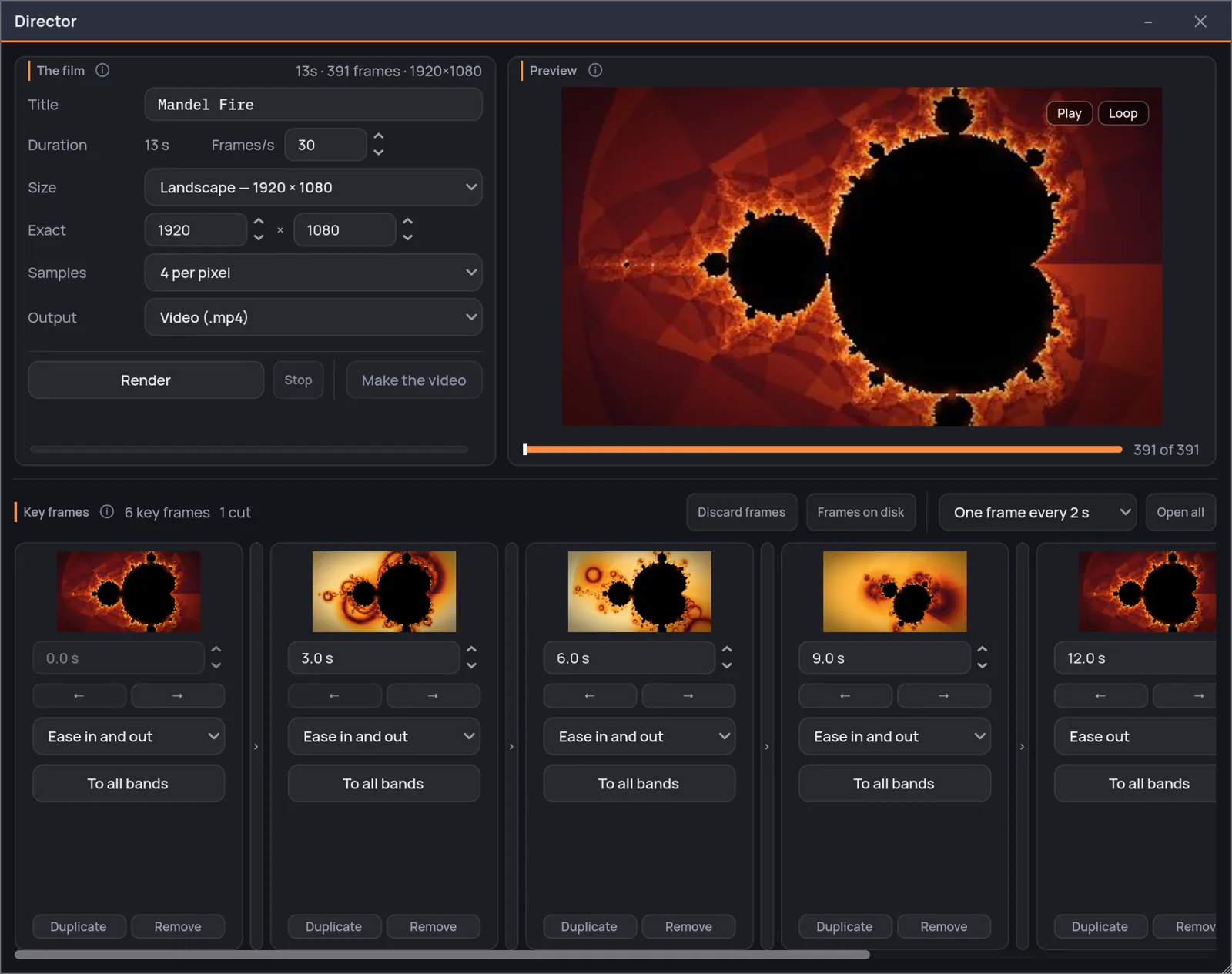
The Director. The preview at the top left, the film and its render
controls at the top right, and the key frames in a row underneath — open a stretch
between two of them and the frames in the middle appear, with the channel bands
under them.
Key frames
A key frame is a whole fractal, with a time next to it.
There is no separate animation mode and nothing new to learn. You
compose in the live view exactly as you always do — dive somewhere, recolor it, turn
a texture on — and then press Use current view. That state, all of it, becomes
a stop on the clock. Compose another and press it again.
Order it by the second it happens at
Every key frame carries two arrows that move it one place earlier or later — dimmed
where there is nowhere to go — and every one but the first a second you can write; the
first is zero, because that is where the film starts, so moving it later hands the
start to whoever is left in front. The film reorders itself around them, and it lasts
as long as its last key frame — so lengthening it is a matter of moving the end.
Reorder · duplicate · take the live view back to any frame
Choose the pace of each stretch
The span between two key frames gets a pace of its own: straight through, ease in
and out, ease in, ease out, or all of the movement crammed into the first or second
half. It is the difference between a camera and a lift.
Six paces · per stretch · or hand it to every band at once
Go back and fix one
Take the live view here puts the main window back into that exact state.
Fix what is wrong and press Use current view: the corrected state arrives
as a new key frame at the end of the film. Set its time to put it where you want
it, and Remove takes the old one away.
The live view is the editor · the fractal is never retyped
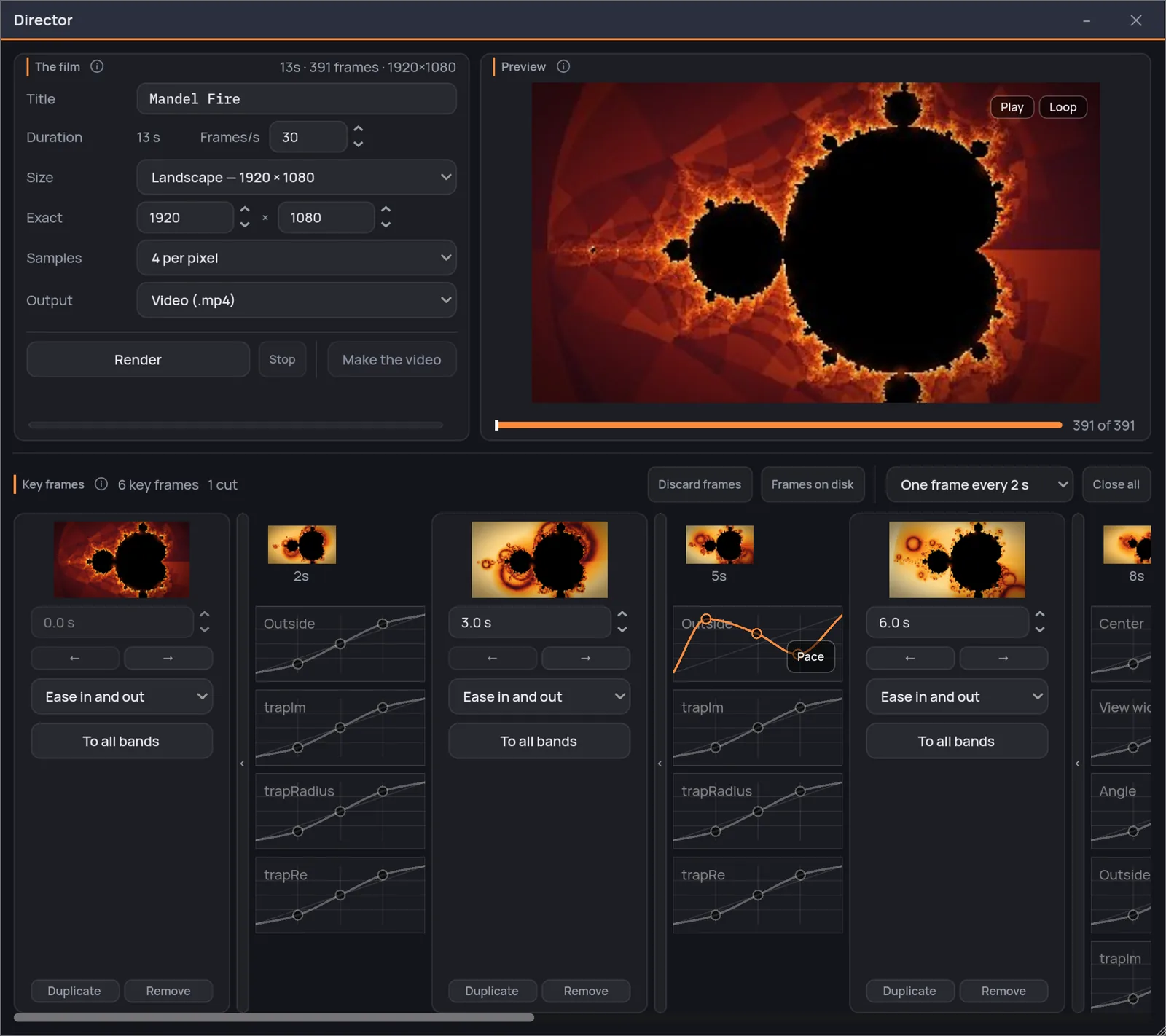
A key frame is a whole fractal with a time next to it. What sits
between two of them is the stretch that joins them, and opening it shows one band per
channel that moves along the way — each with its own curve, editable by hand.
Channels
The picture does not move as one block.
Between two key frames the film interpolates the controls one at a
time, each on a band of its own. The center, the view width, the angle, the
parameters of the family, the color ramp, the tone, the inside and outside colors,
and every finish that moves between the two — each gets a band, and each band can
be given a speed curve of its own. The iteration count is the one exception, and on
purpose: it is held at a single value for the whole film, the highest of the key
frames, because a count that drifted during a descent would move the border between
inside and outside and set the edges flickering.
CenterView widthAngleColor rampRamp smoothingToneInsideOutsideRelief lightGlowInk strokeHatchingHalftoneConformal chartFilm finishand the rest of the panel, band by band
A band left gray follows the pace of its stretch.
Draw a curve on it and it goes its own way — the zoom can keep gliding while the
color snaps.
Some things cannot fade
Between one fractal family and another there is no halfway, and
the Director says so instead of inventing one. A change of family and a switch
between a map and its Julia snap at the key frame, and the header counts them
before you press render. A named choice or a whole count is different: those get
a band with a staircase drawn on it, and you drag a step to the frame where the
shape should change — a count climbing from two to six is four steps, and you
place all four.
Open the stretch you are unsure about
An open stretch draws one real frame every so many seconds, so
you can see what the middle actually looks like instead of imagining it. It
changes nothing about the film — only how much of it you are shown at once.
Play back what exists
The preview plays the frames already on disk, once or on a loop.
It is not a simulation: the finished frames where they exist and are still this
film's, and the 320-pixel draft frames everywhere else — never a guess. Bend a curve
after a render and the full-size frames stay on disk untouched, but the preview stops
using them and shows the draft, which is redone at every edit.
Rendering
It runs behind you, and it remembers where it got to.
A film is a lot of frames, and none of that should stop you working.
The render goes off into its own process with its own small window, and that window
has a dial: low power, balanced, or full power. Balanced leaves two cores free,
which is what keeps the computer usable; low power halves the workers and rests
between frames, for the laptop that gets hot. You can move the dial while it is
running — it applies from the next frame — and keep exploring in the meantime.
Stop it whenever you like
The frames already rendered stay on disk. Start again and it picks up from
there — and if you only reworked one stretch, it redoes that stretch and keeps
the rest. Change something that rules the whole film — the size, the frame rate,
the sampling, the output — and the old frames go, because keeping them would
leave a join in the middle of the video.
Resumable · one stretch redone, not the whole film
The draft makes itself
Two seconds after you stop touching anything, Fractaria redoes the whole film
small — 320 pixels on the long side, one sample per pixel, in another process —
and the preview leafs through that, with a bar counting the frames as they land — a
ten-second film redoes itself in about twenty seconds, and when the bar is full the
picture in the corner is the last thing you composed. When it is right, ask for the
size you want: four samples
per pixel is the measured minimum for a film worth keeping, and the draft is there
so you never spend that twice.
320×180 up to 4K · story, post and square for social · or an exact size you type
A video, or the frames themselves
Two outputs, and you choose one before you render. Video packs the frames
into a film ready to post. PNG sequence lays down numbered lossless frames in a
folder you can open, for a grade, a compositor, or the encoder you already trust.
Video · PNG sequence · on macOS and Windows
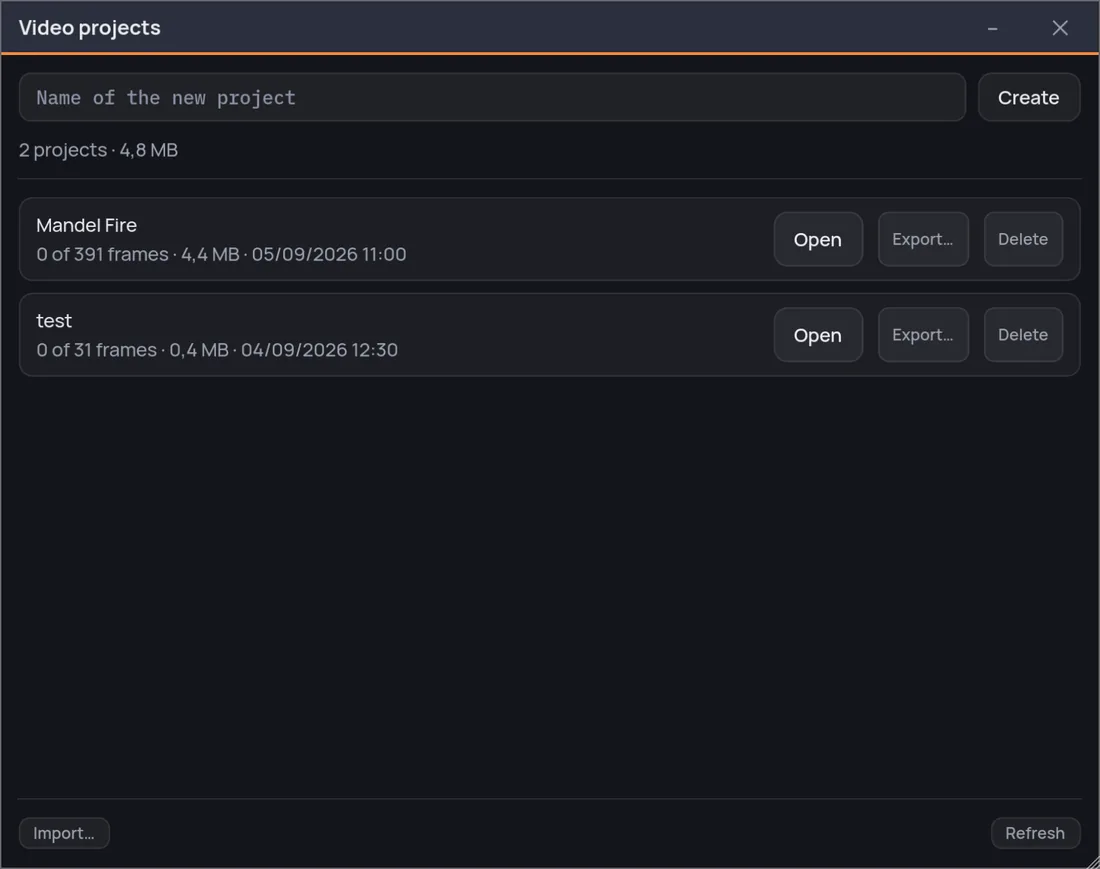
The films you have started. A project keeps its frames, so
closing the window is not the same as throwing the render away — and a film travels on
its own: export the recipe wherever you like, import it anywhere else, and the frames
stay behind, because those are the result and not the recipe.
One purchase, everything included — the Director and the Video Creator
too, not a tier above them. No subscription: every fractal, every palette and every
export size, from the first run.